The short answer
Pick that task and try it in your own installable app build with a fresh account. Record the build, device, actions and result. Check that another account cannot reach the saved data, then repeat the task after a common interruption such as losing the network. If it fails or the access rules have not been checked, keep testing with invited accounts and sample data before opening the app to real users.
What is the difference between a demo and a usable app?
A demo usually follows the path its builder already knows. A new user might deny a permission, lose their connection, mistype a field or return the next day. If you use Expo, Expo Go is a development app with a fixed set of native libraries. Test your own installable build too, because its configuration can differ.
Write down the outcome a visitor came for, such as “create an account and save one project.” Test that complete task before spending time checking every screen.
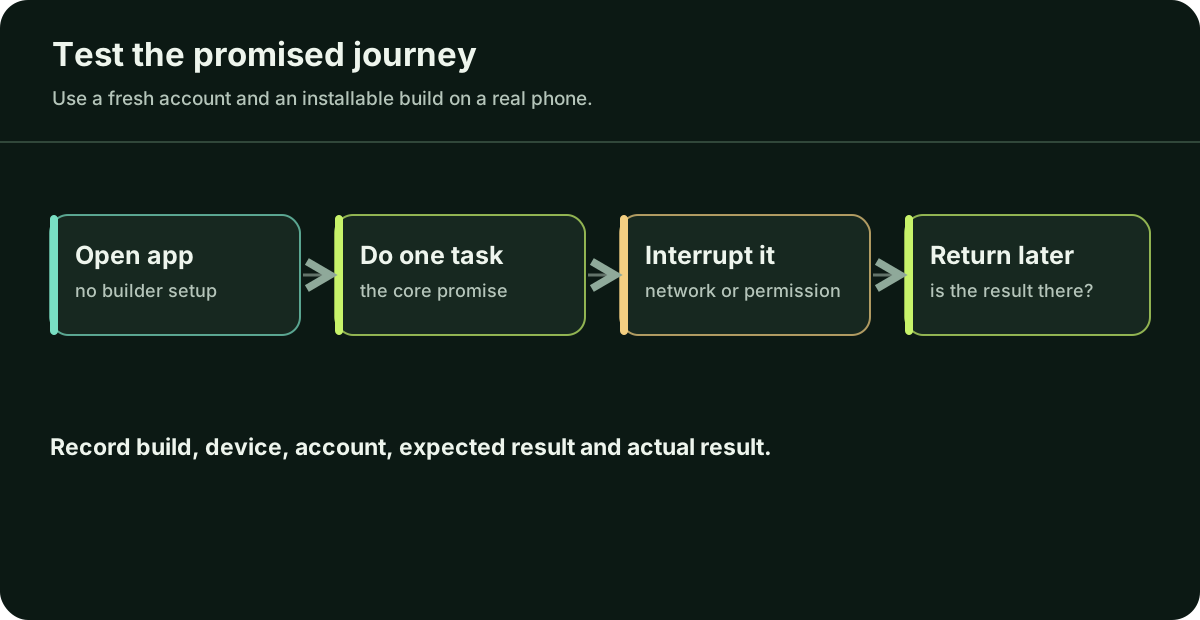
How do I test one real user journey?
- Start clean. Install your own app build on a physical phone, for example through TestFlight or a Google Play test track. Create a new account rather than reusing your developer login. Record the build number, phone and operating system, and whether the app uses your test or live backend.
- Complete the task. Follow the main journey without hidden setup. Note the exact screen and action when a person gets stuck; a video or a few screenshots are more useful than “it failed.”
- Interrupt it. Deny a relevant permission, switch networks, close and reopen the app, and retry a failed action. Check whether the person knows what happened and can recover without losing work.
- Return later. Sign out and back in, or reopen on a second device if the product promises syncing. Confirm that the saved result is still there and belongs to the right account.
Illustrative test note: “Android phone, build 0.8.2, test backend, fresh account: save works online; after the connection drops, the app says ‘saved’ but the record is gone after reopening.” A note like this gives a developer a build and a repeatable symptom. If the main journey fails, limit the trial to invited accounts and sample data until you understand why.
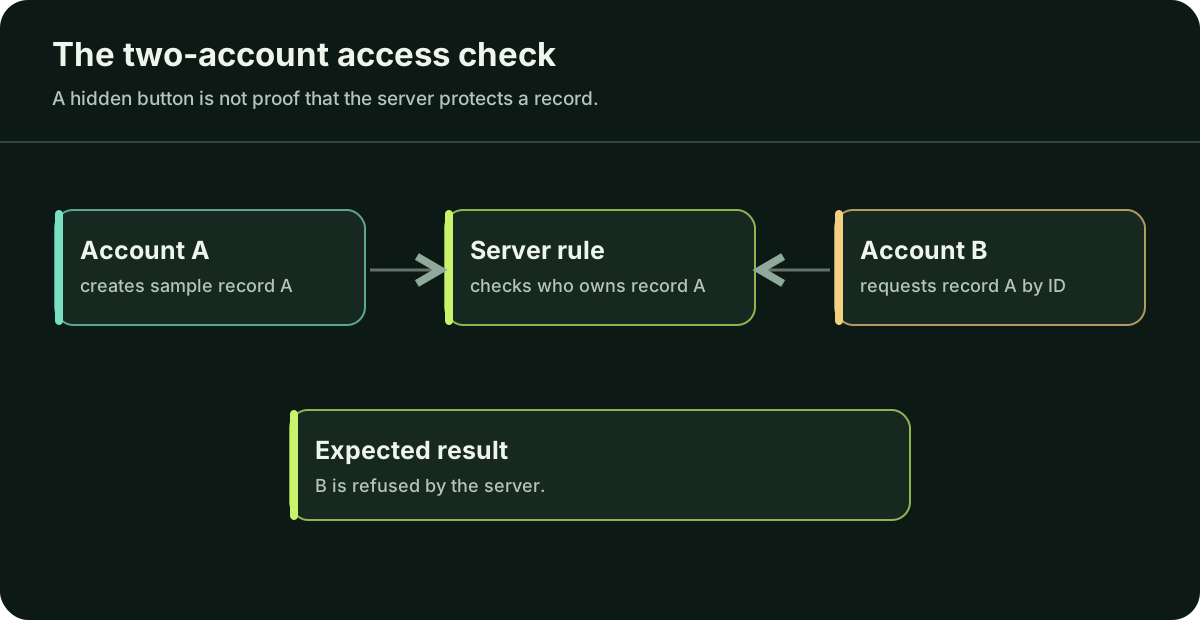
Can one user see or change another user’s data?
Create accounts A and B, each with a different sample record. A screen that hides A’s record from B is a useful first check, but the server must enforce the rule too. On a system you own and are allowed to test, request A’s record by its ID while signed in as B; the server should refuse. If you cannot perform that check yourself, ask an engineer to do it before real customer data enters the app. OWASP describes this as object-level authorization. If B can retrieve or change A’s record, stop the release, fix the server rule and test again.
Check which keys the phone receives. Expo states that values prefixed EXPO_PUBLIC_ are visible in the compiled app. Some keys are designed to be public: for example, Supabase publishable keys belong in client apps, provided access is constrained by the appropriate database policies. Supabase secret and service-role keys have elevated access and belong on a trusted server. If a private key was shipped, rotate it and check what it could access.
When should I invite people, and when should I stop?
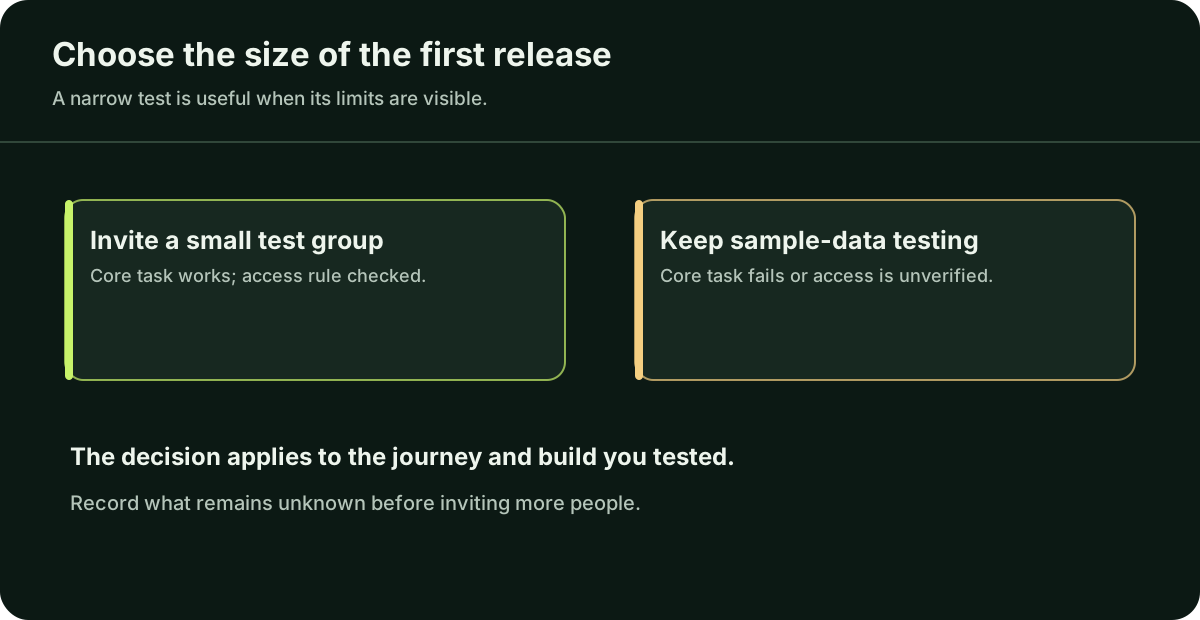
The main task works on a real device, the server keeps the two test accounts' records separate, and people can recover from the interruptions you tried. Give testers a visible way to report problems.
Server access rules have not been checked before collecting real data, a private key is exposed, a payment or saved record disappears, or a serious failure has happened and you cannot yet explain it. If another account can access data, fix that rule before expanding the test.
This check covers only the task you tested. Keep the invitation small and note what remains untested.
What should I hand an engineer if I need help?
Send the repository or a safe way to access it, the exact build/version, one sentence describing the intended user outcome, steps to reproduce the problem, expected and actual results, and redacted logs or screenshots. State whether real users are affected. Never put passwords, private keys or another person’s data in a public issue or enquiry form.
These details let an engineer reproduce the failure before estimating a fix. If the concern is data access, they can check the rule with your two test accounts. For store release questions, read the App Store and Google Play guide.
Questions you may be thinking
Does a working preview mean my app is safe to launch?
No. A preview can hide differences in native configuration, accounts and production services. Test an installable build and the real user journey before expanding access.
How many features should I test first?
Start with one task whose failure would make the app useless or unsafe. Add journeys as the product and number of users grow; do not confuse a narrow first check with complete coverage.
Can an AI agent perform this review for me?
It can help draft test cases and inspect code, but its answer is evidence only when someone runs the build, verifies the result and checks server-side access with real test accounts.
Sources
These primary sources support the platform claims in this guide. They were checked on 4 October 2026; check the latest documentation before changing your app.
If these checks expose a problem you cannot verify alone, ask a trusted technical professional to inspect the app before inviting more users. If you do not have one, Daniel is available for a scoped review: describe the app in the form or email hello@apptechpartner.com.