The short answer
Start with what you can verify internally: the store transaction, the product, the in-app account, its access permission (often called an entitlement), and the screen or server rule that enforces it. Record the first disagreement. Before requesting a receipt, check whether your own systems already show the purchase or a known delivery failure. Tell the customer what you are investigating and what happens next; do not imply access is restored until you have verified it.
What should you check before contacting the customer?
Many apps use a purchase service between the stores and the app. RevenueCat, used as the example in this guide, receives App Store and Google Play purchases and records which app account should have premium access. Search your store records and, if you use one, the purchase service for the relevant product, recent transactions, app accounts and known processing errors. Write down what you can confirm and what remains uncertain. Do this before asking an already frustrated customer to prove the purchase to you.
Then send a concise update: acknowledge that paid access is missing, explain that you are tracing the purchase to their account, and state the next action you will take. Do not suggest the customer caused the problem; even an account mix-up is something your sign-in and restore flow should handle. If your records cannot identify the transaction, ask privately for the store, approximate time, product name, app version and account used inside the app; a redacted order reference may help. Do not ask for card numbers, passwords, full receipts or purchase tokens in a public issue.
If the app has Restore Purchases, you can suggest it as an optional step after checking your records, while the customer is signed into the intended app account. Do not make restoration the only support response. RevenueCat’s restore guidance explains what a restore can and cannot repair. Verify ownership through the store or purchase service before moving access between accounts.
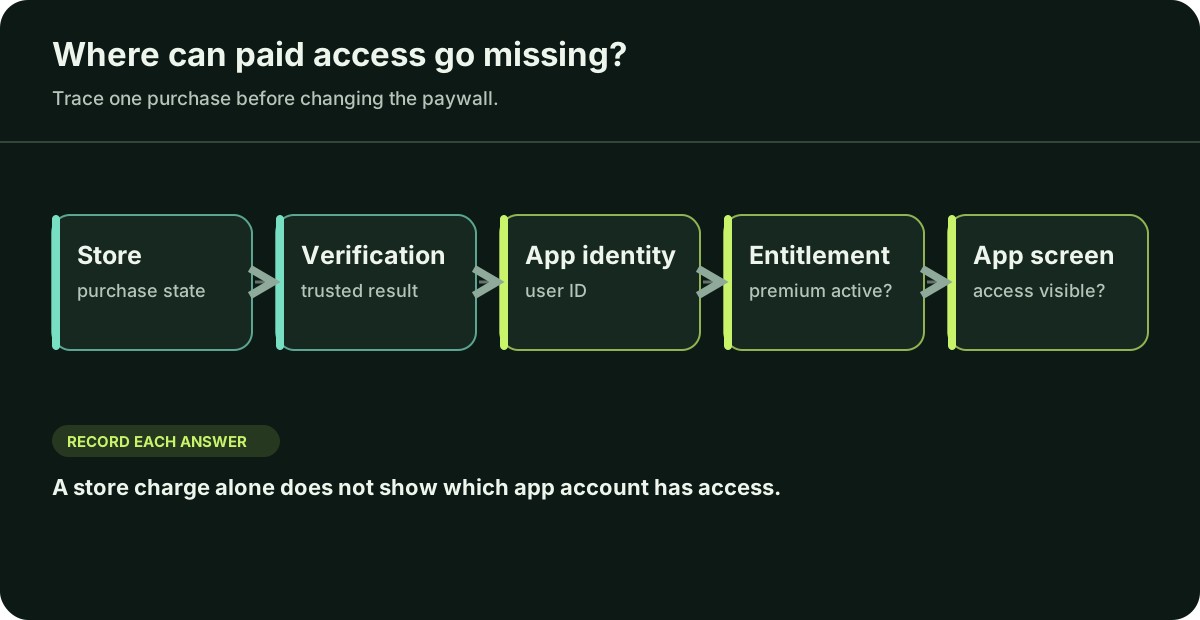
Did the store complete the purchase?
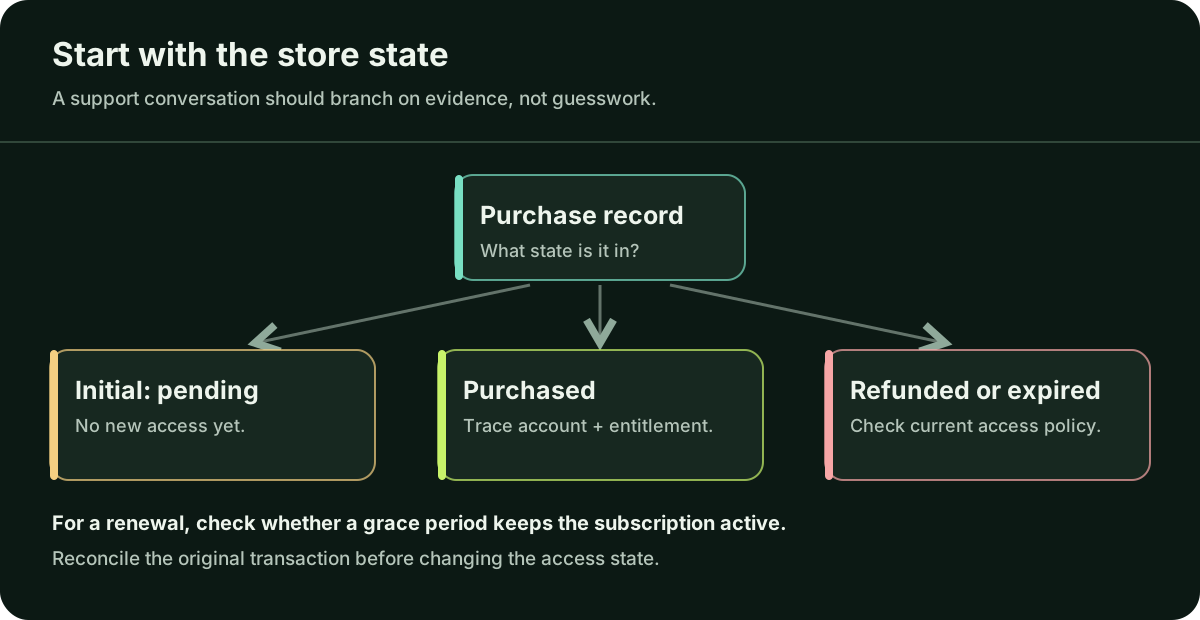
Check the product and current transaction state using your store or purchase provider. On Google Play, grant the benefit only when a new purchase is PURCHASED; a PENDING purchase is not yet an unlock. Verify the purchase on a trusted backend before granting access. On iOS, StoreKit current entitlements help for auto-renewable subscriptions and non-consumable premium products. Consumables need a separate verified transaction and fulfilment check; do not assume they appear in that entitlement list. A bank notification or screenshot from the customer helps you search, but confirm the purchase in the store or provider records before changing access.
For a new purchase that is pending or failed, do not grant new access yet. A failed renewal needs a different check: an existing subscription may remain entitled during a billing grace period on Google Play or Apple. Do not revoke access from a payment-failure notice alone; inspect the current entitlement. If the purchase is completed and current, continue along the chain. For a completed Google Play purchase, also check acknowledgement: Google says unacknowledged purchases may be refunded after three days.
Which app account owns the premium permission?
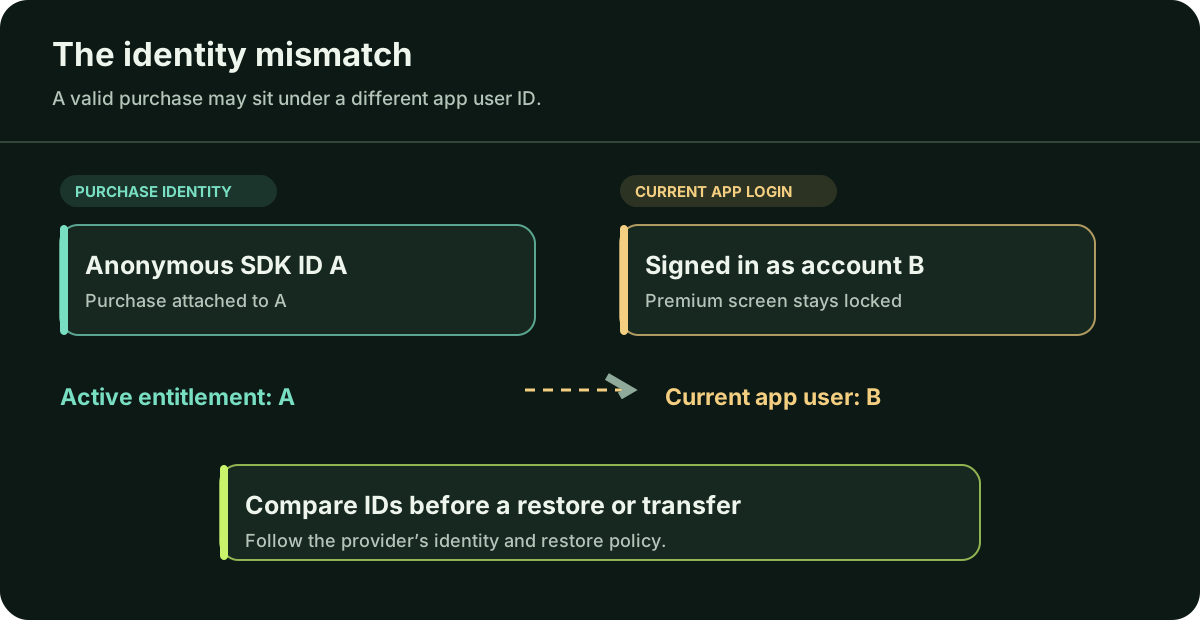
Compare the product identifier with the feature the paywall promised. For a subscription or durable premium product using RevenueCat, attach the product to the intended entitlement; an unattached product can be purchased without unlocking that feature. Inspect CustomerInfo for the affected App User ID. The store account, an anonymous SDK ID and the login inside your app can be three different identifiers.
Illustrative mismatch, not a customer case: the store reports premium_monthly as purchased, while entitlement premium is active under anonymous ID A; the customer is signed into app ID B. That points to an identity-linking investigation, not an automatic transfer. RevenueCat’s login and alias rules determine how those records can be joined.
What if the entitlement is active but the screen stays locked?
Then inspect the app and backend gate. Does the premium screen read the same account and entitlement you just checked? Does it refresh after purchase, restore, sign-in and app restart? RevenueCat caches and updates CustomerInfo; calling getCustomerInfo() retrieves the latest available status. A stale screen should not send a verified buyer back through checkout.
Check a webhook only if your backend depends on it to update its own access database. A delivered event does not prove the right row changed or the app refreshed. RevenueCat webhooks can be retried, so handlers need authenticated, repeat-safe processing and reconciliation with current subscriber status.
How can you prove the repair worked?
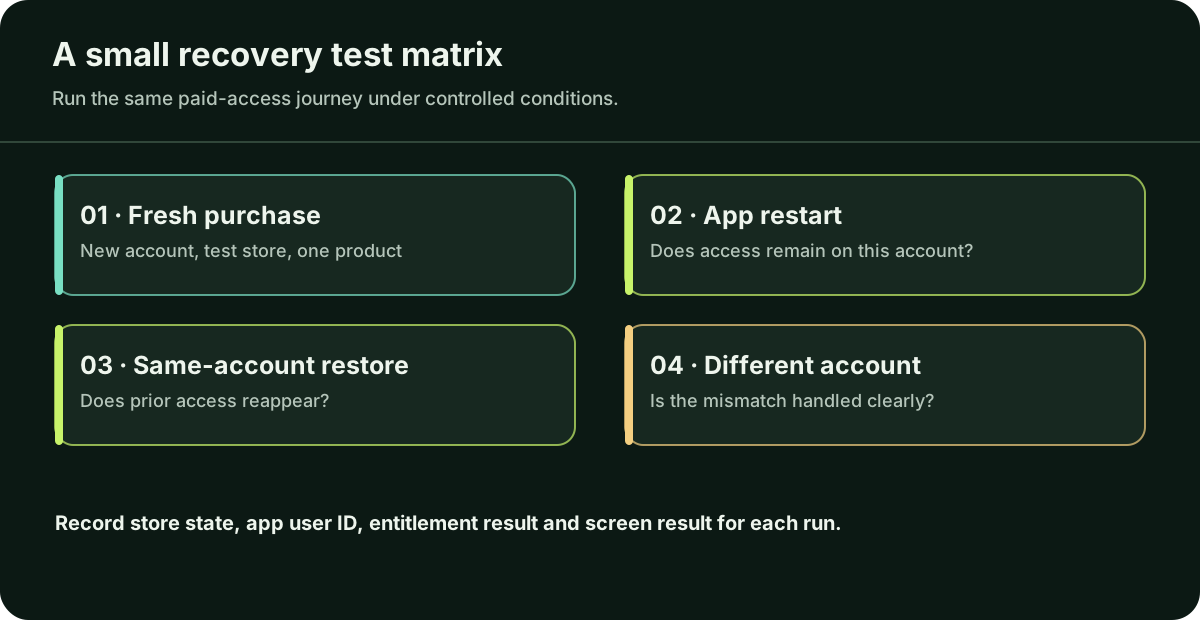
In the relevant Apple or Google test environment, use a fresh account and record the build, product ID, app user ID, store state, entitlement result and premium-screen result. Purchase, close and reopen the app, then restore on the same account if your product supports it. Try a different app account to verify that access does not leak. Also test pending or failed and expired states so a fix does not grant access when the store has not completed payment. Google’s billing tests and Apple’s sandbox tests describe their environments.
A sandbox pass does not resolve the real customer’s case. Reconcile that person’s verified production transaction and explain the outcome privately.
Questions you may be thinking
Can a failed renewal still leave access active?
Yes. An auto-renewable subscription can remain entitled during a configured billing grace period. Check its current store or purchase-provider status before removing access.
Is the Apple or Google account the same as the login inside my app?
Not necessarily. A store account, anonymous purchase-service ID and your own app login may differ. Compare their mapping for the affected purchase before transferring access.
Can I test this without charging a real customer?
Yes. Apple sandbox and Google Play Billing test environments support purchase scenarios. Use the relevant test account and product setup; afterwards, reconcile the actual customer separately.
Sources
Apple and Google Play documentation describes the store side. The RevenueCat pages apply only if your app uses RevenueCat; if you use a different purchase service, check its own documentation for the equivalent records. They were checked on 4 October 2026; check the latest documentation before changing your app.
- Google Play: integrate Billing and purchase states ↗
- Google Play: subscription lifecycle and grace period ↗
- Google Play: purchase verification and security ↗
- Apple: current StoreKit entitlements ↗
- RevenueCat: products and entitlements ↗
- RevenueCat: CustomerInfo and active subscriptions ↗
- RevenueCat: identifying customers ↗
- RevenueCat: restore behavior ↗
- RevenueCat: webhook delivery ↗
- Apple: sandbox testing ↗
- Google Play: billing tests ↗
If a verified buyer remains locked out, ask a trusted mobile professional to trace the exact purchase journey and restore access responsibly. If you do not have one, Daniel can investigate one agreed blocker; send the redacted details in the form or email hello@apptechpartner.com.