The short answer
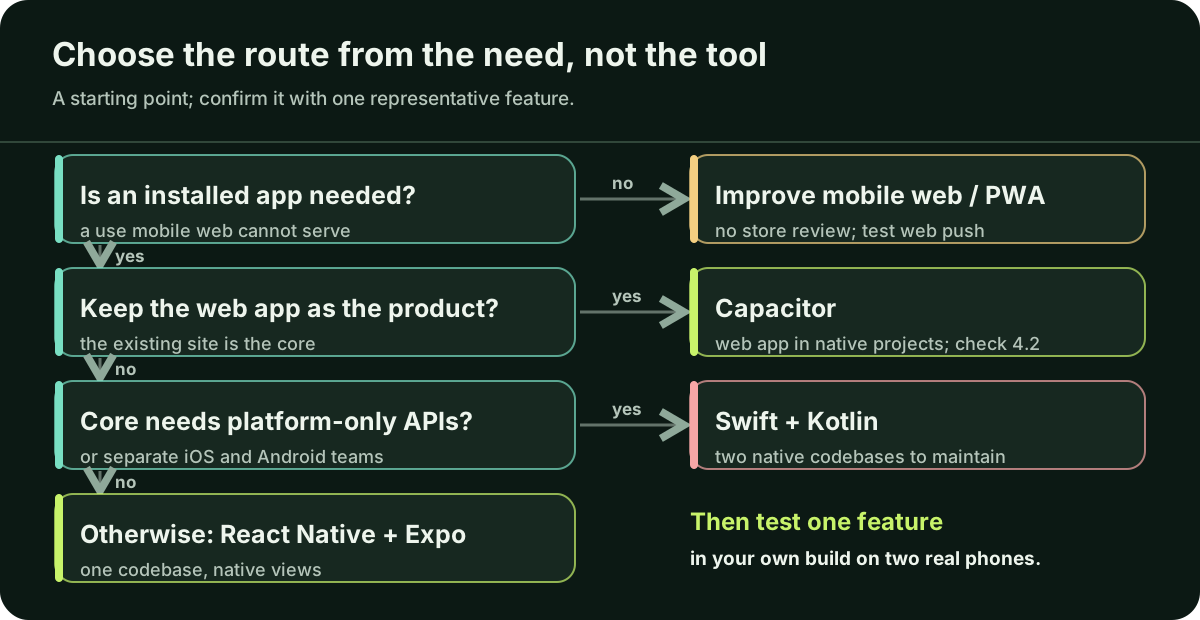
First check whether an installed app solves a need your mobile website cannot. If it does not, improve the mobile web experience. If it does, start from what you have: Capacitor can package an existing web app, React Native with Expo builds one app for iOS and Android, and Swift with Kotlin suits a product built around platform-specific features. Expo is a framework for React Native, not a separate engine. Replit is where code can be written and hosted, not the framework on the phone. Before committing, build one representative feature in your own app build and test it on an iPhone and an Android phone.
Replit, Expo, React Native: which part does what?
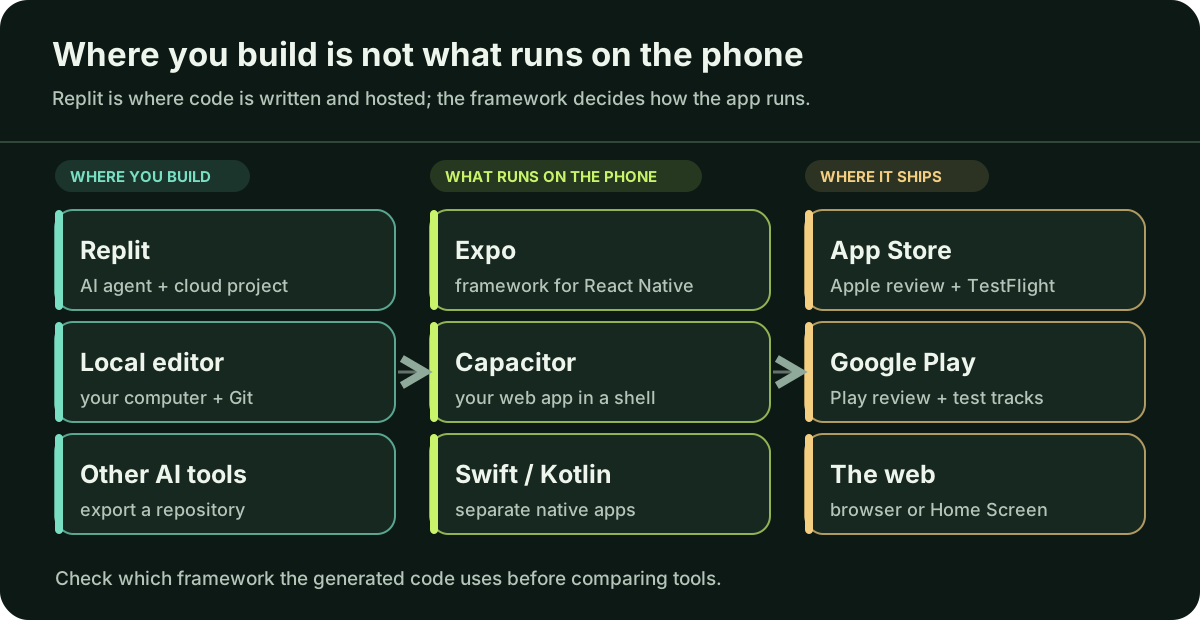
Replit describes its apps as cloud-hosted projects whose code, data and assets you create, run and publish in its environment, often with its AI Agent writing the code. Replit is a development platform: the place where the code is written and hosted. The framework is what runs on the phone.
When Replit’s Agent creates a native mobile app, its documentation says the project uses Expo and React Native and is previewed in Expo Go. When checked on 5 October 2026, the same page said EAS Build, Expo’s build service, is not supported on Replit and that publishing to Google Play is not yet supported. If your Replit project is a website, it is not a mobile app yet; the routes below are ways to make it one.
React Native lets you write the interface in JavaScript, and at runtime it creates the corresponding Android and iOS views. Expo is an open-source framework built on React Native, and React Native’s own setup guide recommends a framework such as Expo for new apps. So “Expo or React Native?” is not a choice between two engines. The real question is whether the features you need work with the libraries and build process you choose.
Does an installed app solve a real need?
An app adds developer accounts, builds, store review and updates on two platforms. Write down the three strongest reasons someone would install it instead of opening your website, then test each one:
Will people use it several times a week? Your web analytics can show how often current visitors return. A task done once a month may be better served by a fast mobile page.
List what the main task needs: camera, location, Bluetooth, offline use or files. Check whether those features work in the mobile browsers your users have. If the main task cannot work there, that is a strong reason for an app.
Push can bring people back only if they allow it. On Android 13 and later, a newly installed app’s notifications are off until the user grants permission, and iOS apps must ask too. Since iOS 16.4, web apps added to the Home Screen can receive web push after the user taps to subscribe. Treat notifications as something to test, not as guaranteed retention.
If none of the reasons holds up, improve the mobile site or make it a progressive web app that people can install from the browser, with no store review. Record the result that would change your mind, such as an illustrative “most weekly users say they would turn on reminders,” so you can revisit the decision with evidence.
What are the realistic routes to an installed app?
App Tech Partner works mainly with React Native and Expo; read this comparison with that in mind.
Capacitor is a native runtime for web apps: your built web pages run inside generated iOS and Android projects, and plugins connect JavaScript to native APIs. It suits a working web app you want to keep as the product. Someone still maintains those Xcode and Android Studio projects. A plain wrapper is a review risk: Apple guideline 4.2 asks for features that elevate an app beyond a repackaged website, and Google Play’s policy lists static apps without app-specific functionality as violations.
One JavaScript or TypeScript codebase produces iOS and Android apps with native views. It fits a new app, a team that knows React, or a Replit project already generated with Expo. When a library needs native code, Expo supports custom native code through your own development build and config plugins.
Apple’s SwiftUI and Google’s Kotlin-first Android tools work directly with each platform. The cost is two codebases, usually needing different skills. It fits a product whose core depends on platform-specific behavior, or a company planning dedicated iOS and Android engineers.
Will my integrations work in that route?
List every service the first release depends on: sign-in, payments, push notifications, maps, analytics, file upload and any hardware. For each, find the official SDK or library and record three facts: whether it supports your route, whether it contains native code, and when it was last updated.
Native code changes how you test. Expo Go has a fixed set of native libraries and does not support remote push notifications. A library outside that set needs a development build, essentially your own version of Expo Go, rebuilt when you add native libraries, change app configuration or upgrade the Expo SDK. Expo’s library guide explains how to check compatibility. With Capacitor, ask whether an official or community plugin exists, or whether someone will write the Swift and Kotlin.
Store payment rules apply whichever route you choose. If you sell digital features, the locked-premium guide shows how a purchase becomes access.
How do I test the choice before committing?
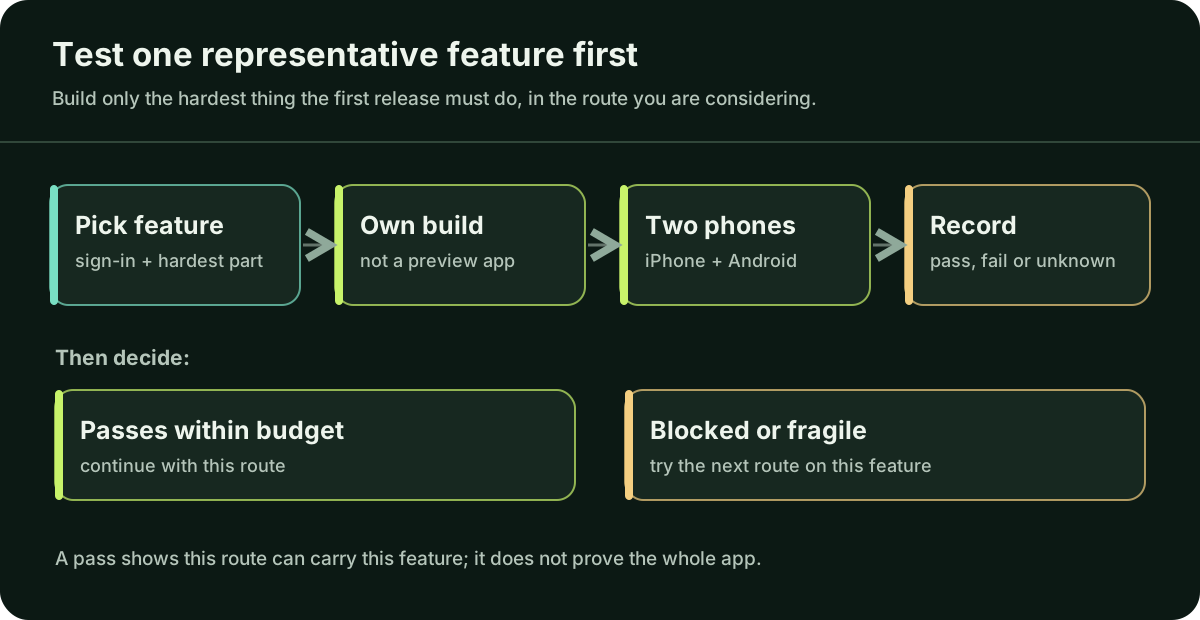
Choose the feature most likely to break the plan, not the easiest screen. Often that is sign-in combined with the hardest integration. Building only that feature limits the cost of being wrong.
- Define it. Write one sentence, for example (illustrative): “A signed-in user scans a receipt offline, and it uploads when the connection returns.” State what counts as a pass.
- Build it in your own app build. For Expo, that means a development build; for Capacitor, the generated native projects; for native, an Xcode or Android Studio project. A preview inside another app does not count.
- Test on physical phones. Use an iPhone and an Android phone, including an older one if your users have them. Deny a permission, lose the network and reopen the app.
- Record the result. For each integration, note pass, fail or unknown, with the library version. A pass shows that this route can carry this feature, not that the whole app will work.
If the feature fails for a reason the route cannot fix, try the next route on the same feature before writing more code. If a Replit project needs a library Expo Go lacks, decide where you will produce development builds, because Replit’s documentation said EAS Build is not supported there.
Who will build and maintain it after launch?
Every route needs someone who can produce the next build when Apple or Google change requirements or a library ships a security fix. Answer three questions in writing. Can you export the complete repository from the tool it was built in and build it elsewhere? Which developer accounts and signing credentials does your company own? Who will handle platform updates: a React Native developer, a web developer comfortable with Xcode and Android Studio, or two native developers?
The answers can change the choice. A route your team can maintain beats a technically stronger one nobody can update. When the plan is settled, the store publishing guide covers accounts, builds and review, and the readiness guide covers your first real users.
Questions you may be thinking
Is Expo a different technology from React Native?
No. Expo is a framework built on React Native. An Expo app is a React Native app with extra tools, libraries and build services, and it can include custom native code through development builds.
My app was built on Replit. Do I have to move it?
Not necessarily. Replit documents previews and an App Store submission flow. When checked for this guide, it also said EAS Build and Google Play publishing were not supported, so an Android release or a native library outside Expo Go may require building elsewhere. Check the current documentation and confirm you can export the full repository.
Will push notifications improve retention?
Only if people grant permission and the messages are useful to them. Measure opt-in and return visits with real users after launch rather than assuming an app will lift retention.
Can I start with the mobile web and build an app later?
Yes. The web version can show which features people actually use before you take on store review and app builds. Keep business rules and data on the server so that a later app can use them.
Sources
These are the official Replit, Expo, React Native, Capacitor, Apple, Google and WebKit pages behind the platform claims above. AI builders and frameworks change quickly. They were checked on 5 October 2026; check the latest documentation before changing your app.
- Replit: what Replit Apps are ↗
- Replit: native mobile apps, Expo Go and publishing limits ↗
- React Native: native components ↗
- React Native: getting started with a framework ↗
- Expo: FAQ on Expo, React Native and custom native code ↗
- Expo: introduction to development builds ↗
- Expo: development builds and Expo Go ↗
- Expo: using libraries ↗
- Capacitor: overview ↗
- Capacitor: adding Capacitor to a web app ↗
- Capacitor: plugins ↗
- Apple: App Review Guidelines (4.2 Minimum Functionality) ↗
- Google Play: functionality and user experience policy ↗
- Android: notification runtime permission ↗
- Apple: asking permission to use notifications ↗
- WebKit: web push for Home Screen web apps ↗
- web.dev: Learn PWA ↗
- Apple: SwiftUI ↗
- Android: Kotlin-first development ↗
If you are unsure which route fits, ask a trusted mobile professional to review your representative feature and integrations before you commit to a full build. If you do not have one, Daniel can help plan a focused first release; describe the app in the project form or email hello@apptechpartner.com.